After dinner in Hongdae, you and your friends duck into a neon-lit 24-hour Coin Noraebang (coin karaoke) and a neighboring Insaengnecut (Life Four Cuts) self-photo studio—the two quintessential late-night rituals of Korean youth culture.
Inside the karaoke booth, you pick up a giant plastic TJ Media remote control packed with 45 Korean-only buttons. Every letter you type inputs Hangul consonants, you accidentally delete the song your friend is currently singing because you pressed the red Cancel button trying to skip a 45-second instrumental interlude, and your paid song credits vanish. Next door at the photo booth, four of you tap “Quantity: 4” expecting four individual strips—only to be billed 16,000 KRW for eight strips because 1 Set already includes 2 strips. Worse still, you hold the wired remote clicker waiting to pose while the 8-second auto-shutter fires relentlessly, and two days later your printed QR video code expires permanently.
Here is the clinical hardware translation and kiosk survival guide to Korean Coin Noraebangs and Self-Photo Booths—decoding every button on the TJ Media remote, interlude-skipping mechanics, photo booth set math, and QR time-lapse video downloads.
VERIFIED FIELD AUDIT (2026 EDITION)
All remote control key mappings, kiosk payment rules, and QR server retention windows in this guide are verified on-site across TJ Media & KY Kumyoung systems and flagship branches of Insaengnecut (Life Four Cuts), Haru Film, Photoism Box, and Don’t LXXK Up in Hongdae, Seongsu-dong, and Myeongdong.
| Studio Brand | Signature Aesthetic & Studio Lighting | Standard Price (2 Strips / 1 Set) | K-Pop Idol & Character Collab Frames | QR Video & File Cloud Retention |
|---|---|---|---|---|
| Insaengnecut (Life Four Cuts) | Warm pastel tones; bright direct front flash; largest nationwide store network | 4,000 KRW | 5,000 – 7,000 KRW (Disney, Sanrio, K-Pop groups) | Printed on strip (Must toggle “QR ON” on setup screen; expires in ~72h) |
| Haru Film | Cool, airy “sky-blue” signature studio lighting; flattering skin-blurring filter | 4,000 – 5,000 KRW | 5,000 – 6,000 KRW (Seasonal artist collaborations) | High-res image + 15s MP4 time-lapse video download (Expires in 24–72h) |
| Photoism Box | Crisp, neutral studio contrast; famous for virtual idol duet “Artist Frames” | 4,000 KRW (Basic classic frame) | 7,000 KRW (#1 official hub for K-Pop comeback / birthday frames) | Instant download via mobile browser; cloud link valid for 24–48 hours |
| Don’t LXXK Up | High-angle ceiling-mounted overhead wide camera; edgy streetwear aesthetic | 5,000 KRW | 5,000 – 6,000 KRW (Fashion brand & hip-hop collabs) | Automatic QR code printed on margin; download strictly within 24 hours |
1. How Unmanned Coin Noraebang Hallway Kiosks Work
Traditional Korean karaoke clubs (Noraebang) rent large private rooms by the hour (20,000 to 35,000 KRW/hr) through a front-desk manager. By contrast, a Coin Noraebang—such as Seven Star, Luxury Su, or Angel Coin—consists of 20 to 40 soundproofed mini-booths designed for 1 to 4 people, operated entirely via a self-service touchscreen kiosk in the hallway.
The 4-Step Room Activation Protocol:
- 1. Walk the Hallway First to Find an Empty Room: Do not touch the payment kiosk until you peek down the corridor to verify which room number (e.g., Room 7 or Room 12) has an open door and an unlit “In Use” LED sign above the frame.
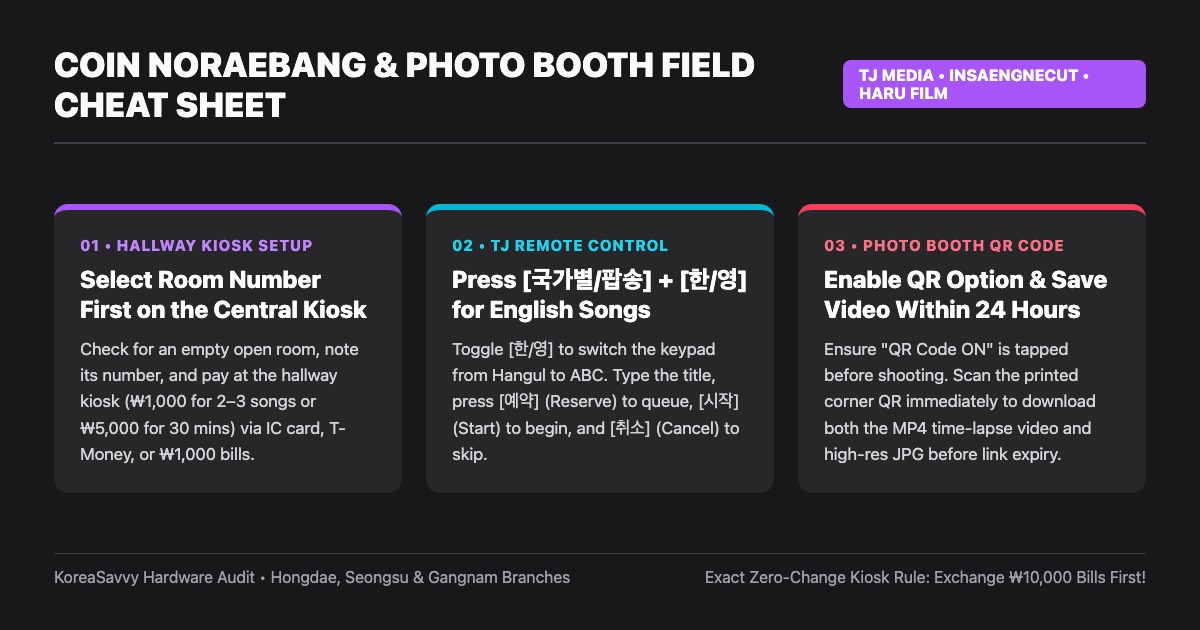
- 2. Select Your Room & Pricing Mode at the Central Kiosk: Walk back to the hallway touchscreen kiosk (many modern kiosks have a small English flag icon in the top corner). Tap your empty room number and choose between Song Count Mode (typically 500 KRW for 1–2 songs or 1,000 KRW for 2–3 songs, ideal for a quick 15-minute session) and Time Mode (typically 3,000 to 5,000 KRW for 30 minutes or 6,000 to 9,000 KRW for 60 minutes, best if you plan to sing more than 8 songs or experiment with tracks).
- 3. Pay via IC Credit Card at the Central Kiosk or Cash Inside the Booth: Only the central hallway kiosk accepts physical IC-chip credit cards (Visa, Mastercard, WOWPASS, NAMANE). Individual coin slots mounted inside the singing booths accept 500 KRW coins and 1,000 KRW paper bills only.
- 4. Grab Disposable Microphone Covers: Next to the hallway kiosk sits a basket of sterile non-woven fabric caps. Stretch a fresh cover over the metal mesh head of each microphone before singing.
2. Decoding the TJ Media Korean Karaoke Remote Control
Over 85% of Coin Noraebangs in Seoul use TJ Media machines (the remaining 15% use KY Kumyoung). While the wall monitor displays lyrics, all song searching and queue management happen on a wide, two-handed plastic remote control printed in Korean.
| Korean Button Label | Romanization | English Function | Exact Operational Use & Survival Tip |
|---|---|---|---|
| 한/영 (or 영문) | Han / Yeong | Korean / English Toggle | CRITICAL: Press this after opening the search bar to switch the keypad from Hangul to English ABC letters. |
| 제목찾기 / 가수찾기 | Jemok / Gasu Chatgi | Search by Title / Artist | Opens the on-screen search bar to type the song title or singer name. |
| 국가별 (팝송 / J-POP) | Gukga-byeol (Papsong) | Filter by Country (Pop) | Filters out Korean songs so your search immediately pulls up US/UK Billboard Pop tracks. |
| 예약 / 우선예약 | Yeyak / Useon-yeyak | Reserve / Priority Queue | 예약 adds to the end of playlist; 우선예약 pushes the song to play right next! |
| 간주점프 | Ganju-jeompeo | Skip Interlude | Skips 30–50s instrumental interlude directly to Verse 2 without canceling the song. |
| 시작 | Sijak | Start Song Now | Starts playing your selected song immediately (only press when no song is playing!). |
| 취소 | Chwiso | Cancel / Skip Track | Aborts the currently playing song! In Song Mode, canceling still wastes 1 song credit. |
| 남/여 키 • 음정 ▲/▼ | Nam/Yeo Key • Eumjeong | Key & Pitch Control | Lowers or raises the backing track pitch by semitones so you can sing comfortably. |
Critical Coin-Saving Tip: “Ganju-jeompeo” (Skip Interlude) vs. “Chwiso” (Cancel)
Pop songs and Korean ballads frequently feature a long 30-to-50-second instrumental interlude between Verse 1 and Verse 2. One of the costliest mistakes foreign visitors make is pressing the red 취소 (Chwiso / Cancel) button trying to fast-forward through the instrumental break—which immediately deletes the entire song and burns one of your paid song credits.
When an instrumental interlude is long, always press 간주점프 (Ganju-jeompeo / Skip Interlude) on the right side of the remote rather than 취소 (Cancel) to protect your paid coins. Pressing Ganju-jeompeo keeps your song active and teleports the track directly to 3 seconds before Verse 2 vocals begin. Additionally, in Song Count Mode, when a song finishes and the loud 100-point score screen and trumpet fanfare appear, you do not have to wait for the animation to end—simply press 시작 (Start) or punch in your next song code to transition to the next track with zero waiting time.
3. Self-Photo Booth (Insaengnecut) Timer, Wired Clicker & Set Quantity Traps
Stepping into an unmanned photo booth like Insaengnecut (Life Four Cuts), Haru Film, or Photoism Box is effortless once you master four hardware and billing mechanics that routinely trip up international tourists:
- 1. The Wired Handheld Clicker vs. 8-Second Auto-Shutter Trap: Inside every booth hangs a wired handheld shutter button (clicker), leading many first-time users to assume the camera will wait patiently until they press the button. In reality, the wired clicker is strictly an “early trigger” switch, NOT a timer pause button. If you press the clicker, the photo fires immediately; however, even if you never touch the clicker, the camera automatically forces the shot the instant the 8-to-10-second on-screen countdown reaches zero. Plan your poses in the outside mirror before stepping behind the curtain!
- 2. The “1 Set = 2 Strips” Quantity Multiplication Trap: On the payment screen, the base 4,000 KRW fee always buys 1 Set = 2 identical printed strips (one for you and one for a friend). When a group of 4 friends wants 1 strip per person and taps “Quantity: 4”, the machine bills 16,000 KRW and prints 4 Sets (8 strips total). If you are visiting as a group of 4, always select “Quantity: 2” (2 Sets = 4 Strips, 8,000 KRW).
- 3. Verify the “QR Code / Video ON” Toggle Before Shooting: What makes Korean photo booths iconic is the printed QR code in the corner of your strip, which links to your high-resolution digital photo AND a hilarious 15-second behind-the-scenes time-lapse video of you posing between flashes. On older terminals, ensure “QR / Video Download: ON” is highlighted on the touchscreen before paying.
- 4. The 24-to-72-Hour Cloud Expiration Rule: The QR code printed on your physical strip does not host your files forever. Depending on the brand, the cloud server permanently deletes your digital photo and MP4 time-lapse video after 24 to 72 hours. Scan the QR code with your smartphone camera immediately after your strip prints and save both files to your phone.
4. The “Zero-Change” Cash Slot Trap & Foreign Card Workarounds
The #1 way tourists lose money in Korean self-photo studios is inserting a 10,000 KRW or 50,000 KRW banknote directly into the photo booth’s bill acceptor to pay for a 4,000 KRW photo strip.
ZERO-CHANGE HARDWARE WARNING: Individual photo booth bill acceptors in Korea do NOT carry a cash-dispensing hopper and cannot return change. If you insert a 10,000 KRW bill for a 4,000 KRW photo shoot, the remaining 6,000 KRW is lost unless you call the remote call-center number for a manual Korean bank transfer.
- Always Use the Wall-Mounted Bill Exchanger First: Every unmanned photo studio has a dedicated metal Bill Exchanger machine (Jipye-gyohwangi) mounted near the entrance or hair-straightener vanity wall. Feed your 10,000 KRW bill into that exchanger first to receive ten crisp 1,000 KRW bills, then insert the exact 4,000 or 5,000 KRW amount into the photo booth.
- Card Payment Compatibility: While 90% of flagship booths in Hongdae, Myeongdong, and Seongsu accept physical IC-chip Visa/Mastercard and WOWPASS cards (tap “Card Payment” on the touchscreen before inserting your card chip-first), Apple Pay / contactless NFC tap is frequently unsupported on older domestic VAN terminals. Always carry a physical IC card or 1,000 KRW bills.
TJ Remote Button Decoder & Photo Booth Set Calculator
2026 Kiosk & Set Math Verified
6,000 KRW
~$4.40 USD
Select: 1 Set (2 Strips)
4,000 KRW total
[간주점프] Ganju-jeompeo
Protects Paid Coins
Press [간주점프] (Ganju-jeompeo) on the right side of the remote to jump directly to 3 seconds before Verse 2 vocals start. NEVER press the red [취소] (Cancel) button during an interlude or you will lose your paid song credit!
5. Actionable IF-THEN Execution Protocols
- IF a pop song or ballad enters a 45-second instrumental interlude between Verse 1 and Verse 2, THEN press 간주점프 (Ganju-jeompeo / Skip Interlude) on the right side of the remote—never press the red 취소 (Cancel) button, which deletes the entire track and wastes your coin.
- IF you are visiting a photo booth in a group of 4 friends and want 1 strip each, THEN select "Quantity: 2" (2 Sets = 4 Strips, 8,000 KRW) on the touchscreen rather than "Quantity: 4" (which prints 8 strips for 16,000 KRW).
- IF you pick up the wired handheld shutter clicker inside a photo booth, THEN remember it is only an early-trigger button and cannot pause the 8-second screen countdown—be in position before the timer hits zero.
- IF your foreign credit card fails at an unmanned photo booth or Coin Noraebang kiosk, THEN do not insert a 10,000 KRW bill into the zero-change booth slot; break your 10,000 KRW note at the wall-mounted Bill Exchanger (Jipye-gyohwangi) first or review our Apple Pay in South Korea and Foreign Credit Card Acceptance: IC Chip Failures and Unmanned Kiosks guide.
- IF you are planning a late-night itinerary in Hongdae or Seongsu-dong around your photo shoot, THEN pair this guide with our Seongsu vs. Hongdae: Choosing Your Seoul Neighborhood and Cafe Rules breakdown.